Thursday, August 18, 2011

HUAWEI E153 USB MODEM


Product Detail

  • Item Code18158
  • Manufacturer Code-
  • Shipping Weight0.100 Kg
  • Dimensions12 * 8 * 4
 

Feature

  • HSDPA/UMTS 
  • EDGE/GPRS/GSM 1900/1800/900/850 MHz
  • Equalizer
  • Data and SMS service
  • Micro SD Card Slot
  • Plug and play

Package

  • HUAWEI E153 USB MODEM

Requirement

  • Windows 2000 SP4,Windows XP SP2,Windows Vista or
  • Mac OS x 10.4 and 10.5 with latest upgrade
  • Hardware system should meet the recommed requirement for the installed OS version
  • Display Resolution 800 x 600 above

Thursday, July 14, 2011

ATI Radeon HD 4670, Redefining The Mainstream

We have explained in numerous articles in the past that the bulk of GPU sales are made in the form of ether IGPs (Integrated Graphics Processors) or affordable, mainstream graphics cards.  As powerful and exciting as the ATI Radeon HD 4870 X2 or GeForce  GTX 280 cards may be, AMD and NVIDIA simply don't sell as many flagship products as they do mainstream cards.

It is because of this fact that both companies consistently refresh their mainstream offerings every few months or so, and continually push new features and performance down their respective product lines.  As many of you may have expected, since AMD recently released the RV770 GPU, which is the foundation of the Radeon HD 4800 series, a new mainstream offering was obviously in the works.  And today, we can finally show that card to you.

AMD is releasing a new salvo of mainstream graphics cards that should fall in the sub-$80 price segment, dubbed the Radeon HD 4670.  The GPU at the heart of the 4670 is based on the RV770 architecture used on the Radeon HD 4800 series, sans a few stream processors, ROPs, and other assorted elements, but with what is essentially the same feature set as its more expensive counterparts.  We've got a couple of these new cards on hand and plan to show you what they're capable of on the pages ahead. After reading, you may be surprised by what 80 bucks can get you these days...


ATI Radeon HD 4770 40nm GPU, $99 Graphics Return

AMD is launching yet another new ATI Radeon graphics card today. And in light of the current worldwide economic conditions, along with the performance and power consumption data we'll be presenting you on the proceeding pages, we suspect it's going to be a welcomed addition to the company's already potent graphics card line-up.

You see, the brand new Radeon HD 4770 is AMD's first mainstream desktop GPU manufactured using a 40nm process, and as such, it is more economical for the company to produce (with a smaller die size) and it consumes little power relative to the current crop of products manufactured at 55nm. The Radeon HD 4770's main features don't stray far from the other members of the Radeon HD 4000 family, but its specifications are somewhat different due to the use of a new GPU, which was formerly codenamed RV740.

Now then, what if we told you this new lower power GPU also drops in at a miserly $99 price point?  Are the days of the reasonably powerful $99 graphics card back, you ask?  We'll answer that question for you in the pages ahead but in the mean time, the Radeon HD 4770's main features and benefits are listed below for those of you who like to see all of the gritty details. We'll discuss the card itself and its overall performance a little later. Take a look...


ATI Radeon HD 4770

Wednesday, July 13, 2011

Simbadda CST-5100N


Speaker 2.1
Output PMPO: 30 W
Input Impedance: 47K Ohm
Satellite Speaker: 150 Hz - 20 Khz
Sub Woofer: 50 Hz - 200 Hz
Speaker Unit: 2.5"/4 Ohm, 4"/6 Ohm (magnetic Shield)
Power Input: AC 220 V - 50 Hz
Satellite Speaker : 85(W) x 145(H)x60(D)
Sub Woofer: 135(W) x 195(H) x 250(D)
     
Price : Rp 199.000

Thursday, July 7, 2011

Best Gaming Sound Card 2011

Creative Labs SB0880 PCI Express Sound Blaster X-Fi Titanium Sound Card


he X-Fi Titanium uses a powerful audio-processing engine outperforming other motherboard audio options. The Creative PCI Express Sound Blaster X-Fi Titanium sound card allows your PC to perform its audio tasks at optimum levels. How does 3-D positional audio sound? You can locate opponents by hearing, using surround sound speakers or stereo headphones. Imagine hearing crackling gunfire and earth-shattering explosions delivered by the EAX 5.0. Hardware audio acceleration boosts the performance of your favorite games. DVD’s are experienced through cinematic surround sound delivered through DTS and Dolby Digital-EX decoding delivered by PowerDVD’s software. 

The card also features a TOSLINK input at the back which helps with sound functionality discarding static squeak/turn under high processor load. According to users the music quality is excellent and gaming audio experiences incredible. The only drawback seems that while ‘Entertainment Mode’ allows for a impeccable audio experience it seems to deactivate some gaming features. On the other side of the coin, ‘Gaming Mode’ reactivates all the great audio features but the music experience is sacrificed. So, it becomes a bit of a schlep to constantly switch between the two. Omitting all the hiccups users still rate Creative has the best product on the market. 

Best Gaming Sound Card 2011

Creative Sound Blaster X-Fi Titanium HD Internal Sound Card with THX SB1270


Opening up the parcel it is comforting that the Sound Blaster Titanium HD supports a wide range of I/O connectivity featuring ports for mics, headphones, home studio speakers, I/Pods, AV receivers and game consoles like X-Box & Playstation 3. One notices from the sound card design that headphone performance is optimized through 115 dB and 24 bit/96 kHz output support ensuring high definition playback. For musos using their PC’s for audio recordings, mic recordings are also impressive with latency reducing ASIO technology. Installing this card is particularly easy.

The Creative Sound Blaster X-Fi Titanium HD internal sound card has been constructed with top-grade components helping minimize distortion and augment audio playback. Featuring customizable op-amps, preferences can now be tailored for every user. The signal-to-noise ratio is outstanding allowing for first-rate music, movie and game audio playback. In fact, the EAX 5.0 technology makes game play so realistic that enemies are heard before they are seen. Audio buffs have been completely satisfied as the Creative X-Fi that’s optimized for Microsoft Windows 7 and Vista systems.

The THX TruStudio PC effects takes you on a journey to another place with true High-Definition (HD) multimedia. The Titanium HD features THX's TruStudio Pro technology helps with the preservation of the original balance timbre of film audio. Card components pays attention to the pitch details of audio high and mid tones, while lows are defined and tight. Dolby Digital and DTS decoding formats allow your new system multi channel and 5.1 surround sound capabilities. Enhancing your gaming experience, the Titanium HD functions as a dedicated sound unit freeing up resources that’s tied up in audio processes and your PC then diverts it to more crucial tasks like graphical and AL processing. 

Users have tested the audio properties with Westone 3 headphones mentioning the bass along with the soundstage is incredible. It has also been tested with Sennheizer HD800 with 21.8 feet of total cord connected to the Titanium X-Fi HD having no problem to drive the HD800’s 300 ohm nominal impedance. The top-end DAC (Digital to Analog converter) is high grade and its DAC (Burr-Brown PCM1794) parallels other expensive high end CD players (for instance Cary Audio Design CD 306 and Halcro EC800).

Tuesday, July 5, 2011

Best Graphics Cards for Gaming


The heart and soul of any gaming system is the graphics card.  Because many gamers like to upgrade their cards every 12-18 months we decided it would be a good idea to put together an active “best rated” list so you can easily check from time to time.
We’ll sort these cards by giving one NVIDIA and one Radeon choice in each price range.  Our picks are based off of customer reviews, professional ratings, and popularity.

Best Gaming Desktop Cases – PC Computer Builds 2011


It’s not every year that the two biggest chip manufacturers in the world, Intel and AMD, release a new line of processors. In 2011 gamers everywhere are scrambling in order to incorporate the latest in PC innovation and technology so that they can easily play new release games like Battlefield 3, Gears of War 3, Elder Scrolls V, and Call of Duty Modern Warfare 3.
It’s a fact, maintaining proper air temperature for your computer’s internal components makes them perform more efficiently and last longer.  For those looking to build a new custom gaming pc in 2011 we’ve put together a list of the top rated and bestselling PC cases of the 2011.  Cases were rated given data from various manufacturer sites along with feedback and data we’ve received.  Rating is as of July 1, 2011.

Tuesday, June 21, 2011

Sapphire Radeon HD 6950 Video Card Review

Introduction

AMD decided to mix things up a bit when they released the HD6000 series, first by releasing the midrange cards before the high-end, and next by using previous high end naming schemes to describe them. So while the HD 5870 was the previous generation "bad-boy" the new HD 6870 was nothing more than a docile pony designed to give the nVidia GTX 460 some company. So why do this? Some say the change was to expand the product line and offer more high-end card options. This makes sense, considering the current nVidia lineup. Others take a more sinister stance and claim AMD was worried about the new chip architecture and wanted something solid in the market, just in case the next card they released didn't work out.

Regardless of the actual reason the anticipated next gen high-end Radeon card has been released and is available in 2 versions, Radeon HD 6970 and Radeon HD 6950. In this review we will be looking at the Sapphire Radeon HD 6950. Typically the XX50 cards feature the same basic specs as the XX70 counterparts with only a few minor tweaks to help bring the price down.


Specifications
Fabrication Process: 40nm
Core Clock: 800MHz
Stream Processors: 1408 units
ROP Units: 22
Memory Interface: 128-bit
Memory Amount/Type: 2GB/GDDR5 Memory
Memory Clock: 1250MHz (5000MHz effective)
Memory Bandwidth: 160.0 GB/s
DirectX Compliance: 11
Connection: 16x PCI Express 2.1
Form Factor: Dual Slot
Multi-GPU Support: CrossFire
Part Number: 21188-00-40R

Monday, June 13, 2011

DIY Computer Monitor LED Backlight

DIY Computer Monitor LED Backlight
Written by: Alan Parekh at 1:22 pm. Filed under Cool Gadgets, DIY Hacks, Electronic Hacks

Thanks to Astia for sending in this LED backlight project, I think this is the perfect way to add a festive touch to your computer system.
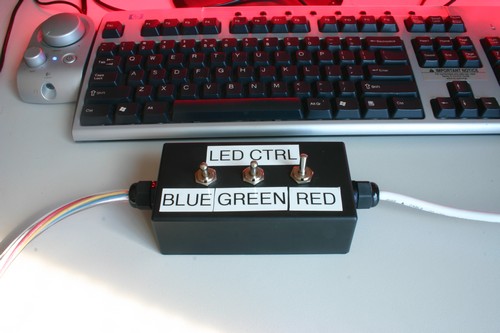
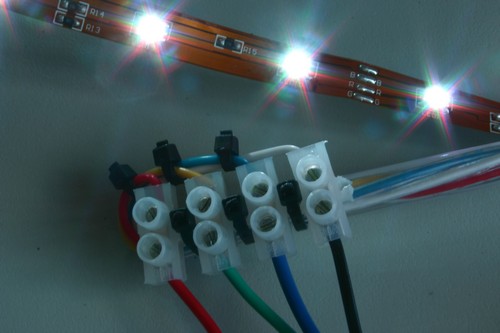
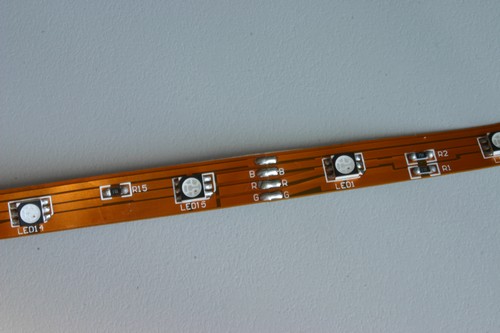
"The whole project consists of architectural strip RGB controlled LED’s … After several meters of the strip LED’s were received as a gift, along with a 12v DC power supply, a colour changing solution was needed to control the strip. After some dabbling to figure out how the circuit on the strip was laid out, it was off to Jaycar electronics for bits and pieces… The strip itself is wired so the three colours (red, green and blue) share a common positive off the power supply, and the negative split across the three. The voltage that is applied to the negative controls how bright that particular LED will be, hence the colour mixing. And thus, a controller box was designed and built. The box consists of three toggle switches, which control each colour, or more specifically, the negative to each LED. As a result, colour mixing can be achieved by flicking combinations of various switches. The next thought was the practical application of the strips. During the testing phase, a strip of 8 LED’s had been stuck to the underside of an LCD monitor, thanks to the adhesive backing, to achieve a neon glow affect. This ended up being the final use, but with several meters of strip lighting the result was significantly more spectacular."


LED Versus LCD Monitors

Computers are important electronic devices in a world of technology in which changes need to be made so as for all sorts of improvements to be made possible in all sorts of domains. Computers need to be good quality ones in order to enable such improvements. A very important hardware component which is said to widely influence the performance of our computers is the monitor on which results which come from all kinds of instructions which we require for the computer system to operate are displayed.
Nowadays there are numerous models of computer monitors available for everyone interested in learning more about them to analyze and compare. Many users have also been interested in being able to learn about important aspects related to the idea of considering a LED versus LCD monitors comparison, as they are widely used nowadays and users should be able to decide which of them they might enjoy more working with.

When trying to discuss about important aspects in a LED versus LCD monitors comparison there are important aspects which need to be mentioned and we should first of all mention that the main difference between LED and LCD monitors is related to their backlighting techniques.

This difference is very important to be taken in account because the lighting techniques are said to influence the picture quality very much and in this way they can represent an important factor which might help users decide which of these two types of backlighting techniques might be more appropriate for them to consider in a computer monitor. In this respect, in a comparison such as LED versus LCD monitors it needs to be mentioned the fact that LCD TV monitors use fluorescent type of tube lightning while LED TV monitors are said to use the light being emitted by diodes. It should also be made aware to all of us the fact that there are both diverse types of fluorescent lights and LED backlighting styles available nowadays.

Other aspects which should be considered in a comparison such as the LED versus LCD monitors one are the contrast presented by these monitors, the color accuracy presented by them, the viewing angles included, certain functional considerations which are also important, their longevity and many other such aspects which might enable users to decide which of them might be more appropriate to be used. In what concerns the contrast presented by these monitors it has been considered that most of the LED TV monitors are advantageous form this point of view.

In what concerns the color accuracy, things are somehow different as both monitors are said to be kind of equal in quality from this point of view. Certainly, this applies in cases in which the backlight color is not affected in any way because when this happens LED TV monitors are once again said to be more advantageous to be used. When discussing about the viewing angles, many users have also considered LED TV monitors to be better. Certainly, these opinions might not be the same among all of us but many of the users who have compared LCD and LED monitors have considered this to be the case.

There are also many situations in which LED TV monitors have been considered equal with LCD TV monitors and which are also important to be mentioned in a discussion on LED versus LCD monitors comparison. These situations refer to their use and to the quality of their video playback. There are also many features which cannot be generally considered either better or worse in one type of monitors or another as this depends on many factors and it cannot be made a general rule concerning them. Anyway, it is always possible for different users comparing LCD and LED monitors to have different opinions and in this way when we are interested in buying one type or another we should also try to compare them so as for a better decision to be made.

The age of CRT (Cathode Ray Tube) is long gone. Earlier TV and Computer monitors used CRT technology that used to generate their own light. But that is out of fashion now and the latest is LED technology. In between LED (Light Emitting Diode) and CRT monitors also came LCD monitors that are still in vogue. Most of the comparison today is between LCD and LED monitors.

It is important to compare LCD and LED technology because they have direct impact on the resolution of TV or computer monitor. Picture quality is the first thing that strikes you when you got to buy TV. Sharper the picture, better the quality. The picture quality of TV sets are directly impacted by the resolution, higher resolution means better picture.

In order to choose between LED Vs LCD monitors it is important to discuss the two technologies in detail. Although LED and LCD monitors use same technology, LEDs are latest and a little advanced.

LCD Technology

Liquid Crystal Display Monitors use cold cathode fluorescent lamps for backlighting. LCD displays manipulate external light to pass through polarized liquid crystals. Which means in order to produce an image on the monitor, the pixels in LCD have to be backlit. This technology uses fluorescent backlights for producing the image on the screen.

LED Technology

The basic technology used in LED and LCD is same. They both use backlight for producing image. The only difference is that while LCD uses fluorescent light, LED uses Light Emitting Diodes (LED) for creating the image on screen. Moreover, LED screens are basically LCD only. LED is an advancement of LCD technology.

Depending on the technology used by LCD and LED here are a few differences between an LCD and LED monitors:

Because LED uses diodes to create pictures on the screen the results are better in terms of picture sharpness and brightness. The colors are more realistic and come to life. If you are interested in graphics or aim at focusing on picture quality while buying a TV or computer, then LED is a much better choice. LED monitors are a great choice for graphic designers.

LED monitors are more expensive than LCD monitors because of the advanced technology. For people who want to focus on picture quality, LED monitors are the best bet. The cost comes into picture while buying TV. Televisions with LED monitors are almost 50% higher in price as compared to those with LCD monitors.

There is also a difference in the power consumption standards of LCD and LED TVs. LED TVs use 40% less power as compared to simple LCD technology. So the running cost of LED monitors is lesser than LCD monitors.

LED monitors are sleeker and lighter than LCD monitors. From this point of view LED monitors are better for wall mounting purpose when you are buying a TV.


Quick Facts on LCD Vs LED

LED monitors consume 40% less power than an LCD monitor. If we compare the screens of LED and LCD Television screens we see that while an LCD screen consumes 0.139 watts per square inch, an LED consumes 0.096 of the same.

2. LED Screens have a faster response time as compares to LCDs. While response time of LCDs ranges between 2 – 8 ms, an LED can respond in less than 0.01 ms.

3. LED monitors have a far better contrast ratio resulting in clearer and sharper pictures. While LCD monitors can produce 20:000 contrast ratio, an LED can produce 2.000:000 contrast ratio.

LED screens are capable of being sleeker and light weight as compared to LCD monitors. For example, Sony launched a 40 inch Bravia screen as thin as 9.9 mm.

From longevity point of view also, LED screens or TVs have longer life. They can run 100 thousand hours, while LCDs can run only for 60 thousand hours.


After reading this account on LCD Vs LED monitors we can conclude that LED monitors are finer versions of LCD technology. LEDs are the latest in monitor technology and offer ultimate color, contrast, and picture quality.

Saturday, June 11, 2011

OCZ Announces the 1010 Watt GameXStream Power


The new 1010W configuration offers a more powerful solution for today's advanced PC systems in the same compact form factor that is an advantage to many gamers and system builders.

The OCZ GameXStream 1010W features active PFC (Power Factor Correction) to effectively regulate input voltage and provide superior operation in a wider range of environments and countries with varying voltages.

The 1010W GameXStream is among the most powerful solutions available, yet remains the quietest PSU around ensuring gamers hear their games and not their PC. Kept ultra-cool with a large 120mm fan, the powerful GameXStream still remains virtually silent and supremely cool even at peak loads.


OCZ GameXStream 1010 Watt PSU

The high-efficiency 1010W GameXStream features a standard-sized power supply form factor resulting in a compact footprint to accommodate virtually all computer towers. The GameXStream PSU connector cables, including quad PCI-Express and a 4/8-pin CPU connector, are wrapped in a flexible mesh promoting a tidy environment inside the case.

Friday, June 3, 2011

External BluRay Player At Last


It seems now only those into Blu-ray discs and devices manufacturing are producing the first external Blu-ray drive. This is probably due to they have just won the HD/DVD and Blu-ray format war and now their position in the market is certain. The first external Blu-ray drive is produced by PLDS or Philips and Lite-On Digital Solutions. The drive is a USB connected (USB 2.0) BD-ROM drive that is capable of reading Blu-ray disc media at 4x, single layer DVD at 12x, dual-layer at 8x and CD at 32x maximum.


According to Gizmowatch, the external Blu-ray drive can only play user-recorded high-def content from a digital camcorder, but not commercial movies released under the Blu-ray Drive format. This is due to the copy protection issues and lagging software development. One reason is due to commercial content is encrypted with High-Bandwidth Digital Content Protection (HDCP) which can be decrypted using a HDCP-compliant graphics card that offers DVI or HDMI connections. And currently in the market, PCs with graphics chips that support HDCP are not available yet, so making it impossible to play the commercial content. Another reason is the Blu-ray disc playback software that can decrypt HDCP isn’t declared as saleable item yet.

Anyway, there is no word on the price and when it hits the street for this first external USB Blu-rayd drive.

LG-Blu-Ray-Disk-Drive


asus-usb-20-blu-ray-drive_1


Tuesday, May 31, 2011

The IPad 2 Was Recently


iTouch 4th 32GB


Detailed Specification iPod Touch 4th :
-Processor A4
-960 by 640 pixel resolution at 326 pixels per inch Retina Display
-3.5-inch (diagonal) widescreen Multi-Touch display
-video recording HD (720p)
-VGA-quality front camera
-802.11b/g/n Wi-Fi (802.11n 2.4GHz only)
-Bluetooth® 2.1 + EDR
-Maps-location based service4
-Nike + iPod support built in
-MPEG-4 video
-Motion JPEG (M-JPEG)
-Support for 1024 by 768 pixels with Dock Connector to VGA Adapter
-Earphones
-Audio formats supported: AAC (8 to 320 Kbps), Protected AAC (from iTunes Store), HE-AAC, MP3 (8 to 320 Kbps), MP3 VBR, Audible (formats 2, 3, 4, Audible Enhanced Audio, AAX, and AAX+), Apple Lossless, AIFF, and WAV

SALE PRICE IN INDONESIA : Rp. 3.300.000,-

Saturday, May 28, 2011

Processor Fan: Asus Arctic Square (Socket 754/775/939/AM2) CPU Cooler - Best Processor Fan for C2Ds & P4s I reckon

I reckon this is the best processor fan for P4s and C2Ds, especially if you've overclocked them slightly to make them sing:

Asus Arctic Square (Socket 754/775/939/AM2) CPU Cooler


Price: £36.99

With four heat pipes, a PWM function that automatically adjusts fan speed according to CPU temperature and almost silent operation, this is by far one of the best processor fans on the market at the moment - AND IT'S AFFORDABLE (even if it is almost as much as the 3GHz P4 is now)!!!

Get from OCUK: Processor Fan: Asus Arctic Square

Sunday, May 15, 2011

PowerDVD 9 – The Best Blu-ray/DVD Player Software Today

The Best Blu-ray/DVD Player Software Today
World-renowned PowerDVD 9 delivers outstanding Blu-ray and DVD movie playback quality on your PC.

NEW High-definition video playback: The best video quality today with powerful support for all Blue-ray Disk and HD video formats — BD-R 1.1, BD-RE 2.1, BD Profile 1.1(Bonus View), BD Profile 2.0(BD Live); AVCHD, AVCREC, MPEG-4 AVC (H.264), MPEG-2 HD and WMV-HD.
NEW Perfect sound effects: HDMI (High-Definition Multimedia Interface) simultaneously transfers 8 channels of audio over a single cable.
NEW PC friendly: A strong audio-visual computing code offers you playing your HD movies smoothly on high or low spec CPUs.
NEW Innovative intelligent OPI: Explore your favorite movies with cool and exciting smart features including two innovations — FancyView for animated browsing and Cinema playback mode…

World Class Audio-Visual processing technologies

Maximize your DVD experience with 4 new TrueTheater™ technologies as below.
NEW CyberLink TrueTheater™ HD: To improve the resolution of the original video, eliminate the distortion and make the image more clearly. It could make the video sampling rate of 480p rised to 1080p.
NEW CyberLink TrueTheater™ Motion: By enhancing the sampling frame rate from 24 fps to 60 fps, to provide a smoother, judder-free playback, used for action films in particular.
NEW CyberLink TrueTheater™ Stretch: Video stretching technology can reduce the image distortion.

NEW CyberLink TrueTheater™ Lighting: It can dynamically adjust the overall scene’s Brightness / Contrast / Saturation.
Don’t forget about TrueTheater™ Surround, which supports three modes: Multi-channel surround sound mode, Virtual Speaker mode and Headset mode.


 All-in-one DVD Player for your PC

Blue-ray movie player: PowerDVD 9 supports the latest Blu-ray Disc BD-Live and Bonus View specifications, allows you to download more value-added film entertainment through the network, and brings you more new Blu-ray interactive experience… Learn more
Excellent DVD player: TrueTheater ™ technologies let you enjoy your DVD movies with no less than the high-definition Blu-ray movie’s quality.
Total disc player: PowerDVD supports BDAV, BDMV, DVD, AVCHD, AVCREC, DVD-VR, DVD+VR, CD, VCD, SVCD and Audio CD.
Powerful video and audio playback: PowerDVD 9 supports almost all popular video/audio formats, such as MP2, MP3, WMA, WAV, M4A, AOB, AC3…, and MPG, MPEG, AVI, WMV, VOB, MOD, TOD, Divx, MOV… Learn more
Karaoke DVD/VCD Player: You can use CyberLink PowerDVD 9 to play karaoke DVD/VCD on your PC, In addition to the surrounding crowd, the effect comes up to the Karaoke room.
Video capturing software: PowerDVD allows you to capture a separate screen from the video is on, and save it as a specific file, wallpaper or start-up image for your PowerDVD…�


For Movie Fans

Using PowerDVD 9, you can create your own movie by remixing original movies, then upload to your Remix Space and everybody’s favorite movies web site, MoovieLive, to share your database information with old & new friends.
Remix your movies
1. Bookmark scenes: Select scenes in your remix by pinpointing start and end points. Create as many scenes as you want.
2. Add animated graphics: Overlay images and apply a path for dexterous movement with the object of your choice…
Movie Collection: Often imitated, never duplicated, start your own today and watch it thrive with the more movies watched.
PowerDVD online platform: The PowerDVD movie haven and everybody’s favorite movies web site – MoovieLive, from here you can not only do film real-time information updates and links, but also be able to upload or download movie remix files, and read other users’ movie reviews…

Thursday, April 21, 2011

HP G72t


HP-G72t-Review


The main purpose why HP designs G72t laptop is to give the users more than the shorter end of computer with standard computing requirements. This machine is created in order to give new impression to many users that this notebook presents effectiveness and efficiency.

The look it delivers is beautiful and stylish. There are three colors you can pick from includes charcoal, matte black, and biscotti. Apart from its design, this unit serves more productivity in sake of communication purpose as well as for the world connectivity. The keyboard fortunately suits the matte surface nicely.


This 17.9-inch diagonally-measured laptop takes a bunch of major specifications onboard. Being claimed as a solid performer, G72t is packed with the latest Intel i3 processor that offers a new and improved experience of multitasking.

HP picks Altec speakers to be built into this machine. These speakers are able to deliver good quality sound. Moreover, there is an optional 512MB or 1GB discrete graphic card if you want to improve the graphic. The connectivity factor is supported with three USB 2.0 ports which can be made use to hook any external device. An integrated Wi-Fi Wireless-N is available to improve the connection quality.

Besides, you can find a HDMI 1.3 port which enables the connection between your laptop with any external monitor or your HDTV. The entertainment enjoyment is completed with Blu-ray ROM/DVD writer for Blu-ray viewing. But you will still be able to read or write CDs and DVDs using this Blu-ray ROM/DVD.

The operating system selected to come with the laptop is genuine Windows 7 Home Premium OS. It is great that HP provides you one limited warranty on hardware with award winning services. This service includes instantaneous chat and email in order to stay in touch with customers. More importantly, all of your queries will be replied in less than an hour.

Getting closer to many reviews regarding G72t, it is found out that this machine gains massive success learning that many people or customers who purchase this unit are satisfied with its performance.

However, there are also some disappointed customers who don’t see the machine meets their expectation. Most of them complained on the lack of performance of keyboard and touch pad, so they must use external keyboard and mouse to solve the problem.

Apart from the disappointment and shortcomings, G72t can be a good preference, especially with the reasonable price tags it.


From : http://www.1computerhardware.com/hp-g72t.htm#more-229